In November we had a show click here to see some of the shots
Some of the following information is compliments of Etobicoke Camera Club and we thank them.
For judging, the images will be projected on to a white matte screen and displayed with consistent
dark backgrounds. Images which carry image-maker identification (i.e. Copyright Watermark)
will be disqualified.
Check out the following links to pdf files for details on checking your color, changing image sizes,
and setting resolution to comply with the requirements of projection:
Color Calibration (note that this file has 2 test pictures in it. If the skintones in the pictures appear normal
on your monitor then your system will be able to create files for projection that will make all colors
appear appropriatly when projected, otherwise you will need to adjust your system color calibration to suit)
Image Size – The maximum image size is 1024 pixels along its longest dimension for competitive
images.
Image Resolution is to be 72 pixels/inch
File Size – Images must be saved as JPEG. The recommended compression level to be used is
10 to 12.
Competition Identification: The following information describes how to submit your files:
Competition Category:
GEN = General
NAT = Nature
SPEC = Special Competition
Division:
B = Beginner
A = Advanced
File Name – File name must include first name, last name, division,
competition category and title of image, as shown in the following example:
First Name_Last Name_Sequence_Division_Competion_Image Title
John_Doe_GEN_A_Moonlight
Submitting Entries – Images must be submitted by email attachments and sent to the club’s
digital imaging email address: cameraclub1@rogers.com OR they may be submitted on a
standard CD as jpegs in PC format. Information is required not later than the night designated
for submissions as shown in the annual program
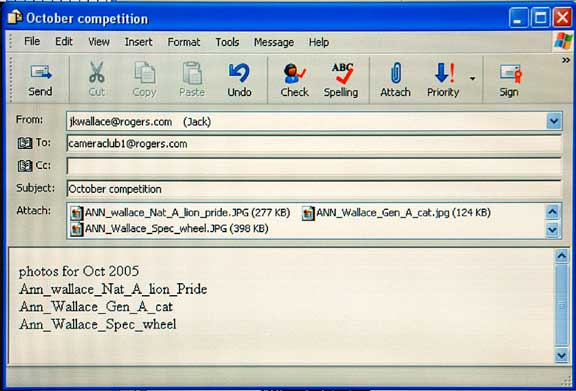
Attach all images to the email (do not send a separate email for each image) and in the subject
field enter the competition name (e.g. October). In the body of the email please
state the maker’s name, the skill category (Beginner or Advanced) and list the attached
images.
Example e-mail with image attachments - for submitting images for Oct 2005